

Privacy focused AI Assistant
Chat, take notes, highlight content, convert PDFs to audio - all completely private and stored locally.
Privacy First Approach
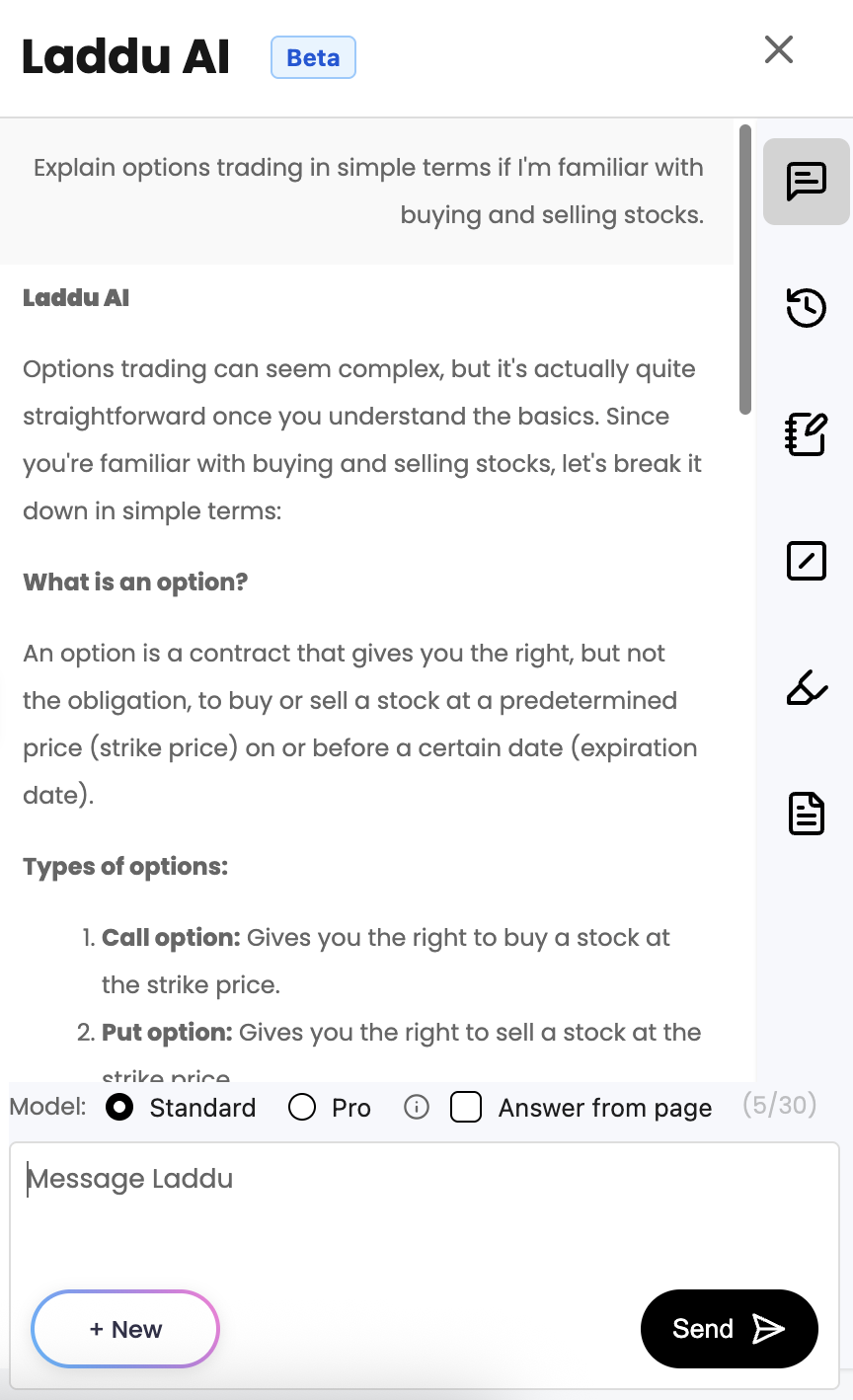
Your privacy is our top priority. All conversations stay local in your browser - never stored on external servers.
-
All conversations stay local in your browser
Never stored on external servers. Your data remains completely private.
-
No account required
Zero personal information collected. No tracking, no data mining.
-
Complete privacy protection
Your data stays secure with local processing and storage.
Powerful AI Features
Advanced AI capabilities that transform how you work and browse, all while keeping your data completely private.
-
Intelligent chat interface
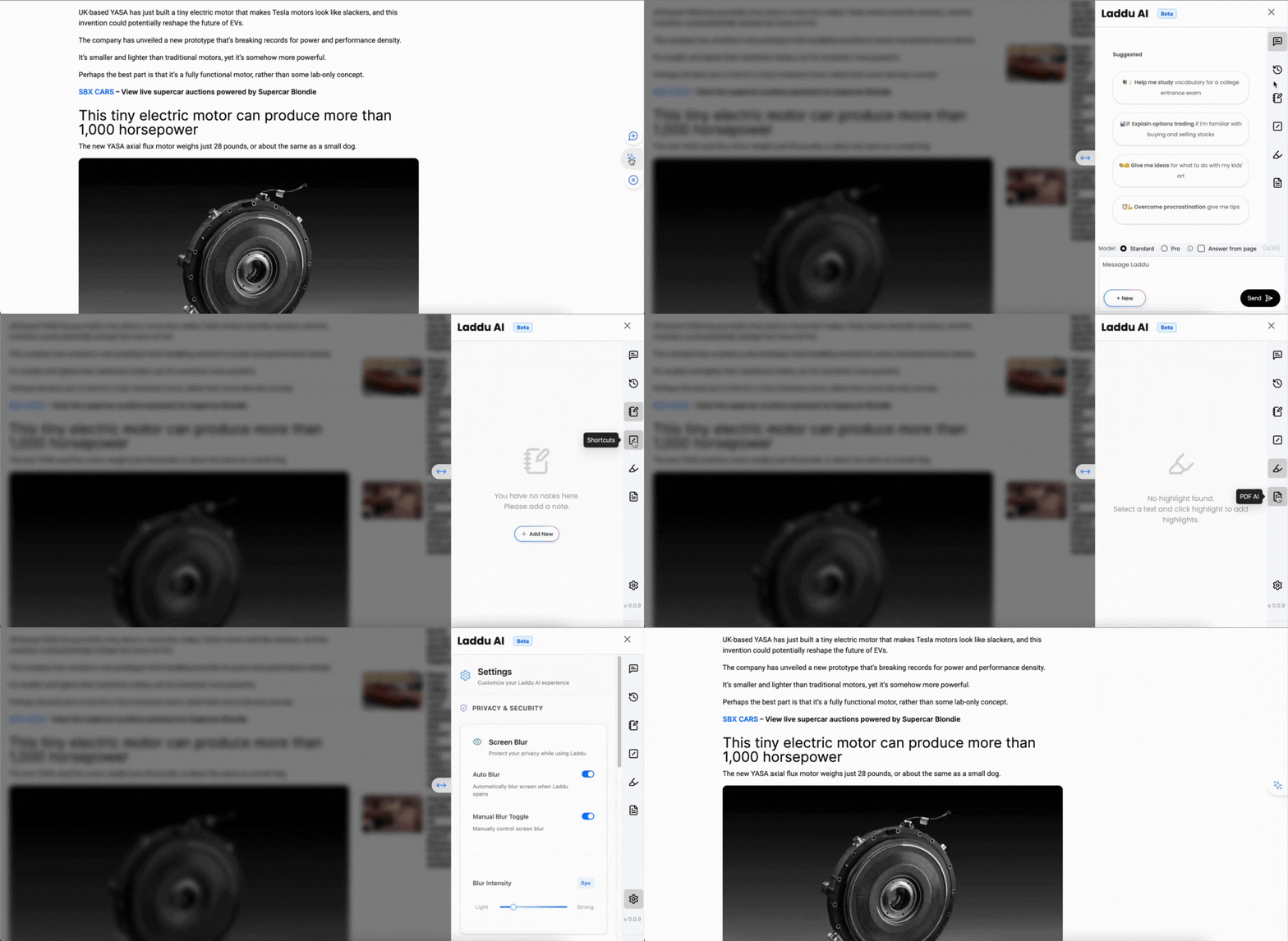
Access AI assistance from any webpage instantly.
-
Context-aware AI
Analyzes current page content for relevant assistance.
-
Fast, streaming responses
From multiple AI models with local chat history.
-
Complete privacy
Conversations stay private with local storage.

Productivity Tools
Five powerful tools that transform how you work and capture information across all websites.
-
Smart Text Selection & Highlighting
Select text anywhere to highlight or save to notes. Works across all websites with local storage for easy retrieval.
-
Personal Notes Manager
Capture thoughts, ideas, and important information instantly. Access your notes from any browser tab.
-
Smart Text Shortcuts
Create expandable shortcuts for frequently used text. Type a shortcut (like /sig) and it instantly expands to save time.
-
AI-Powered Context Menus
Right-click any selected text for instant AI assistance: summarize, translate, explain concepts, get quick replies and more.
-
PDF to Audiobook Converter
Transform documents into audio format for on-the-go listening and accessibility.
SHORTCUTS
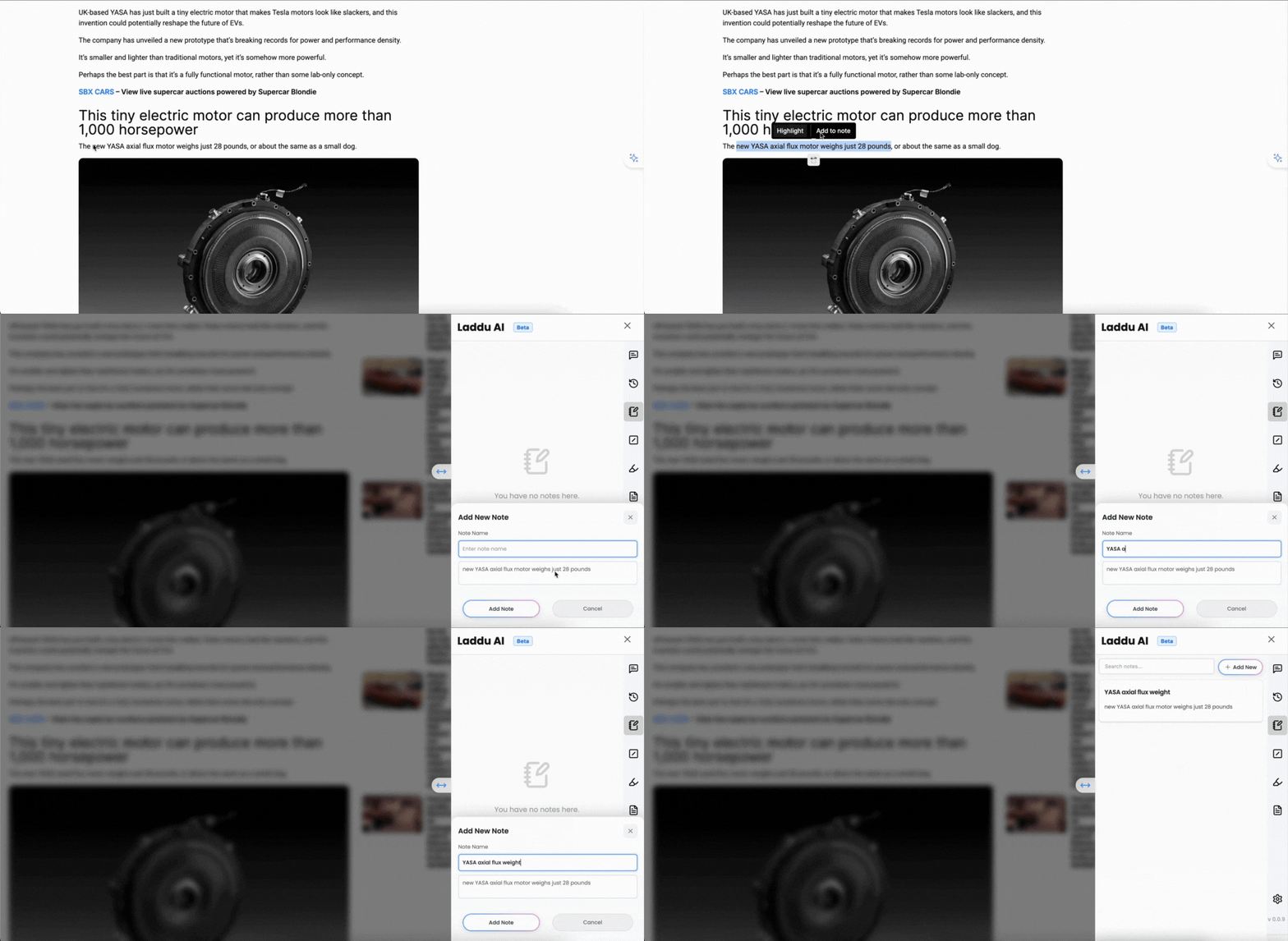
Create powerful text shortcuts that automatically expand as you type, saving massive time and effort for repetitive content entry.
-
Create shortcuts with name and description
Define shortcut name (like /sig) and description for automatic replacement.
-
Type shortcut, get instant replacement
As you type, shortcut instantly expands to full saved description.
-
Perfect for template data entry
Save massive time for repetitive content - emails, signatures, code snippets.
-
Works across all websites
Shortcuts follow you everywhere in text fields, forms, and editors.
Seamless Integration
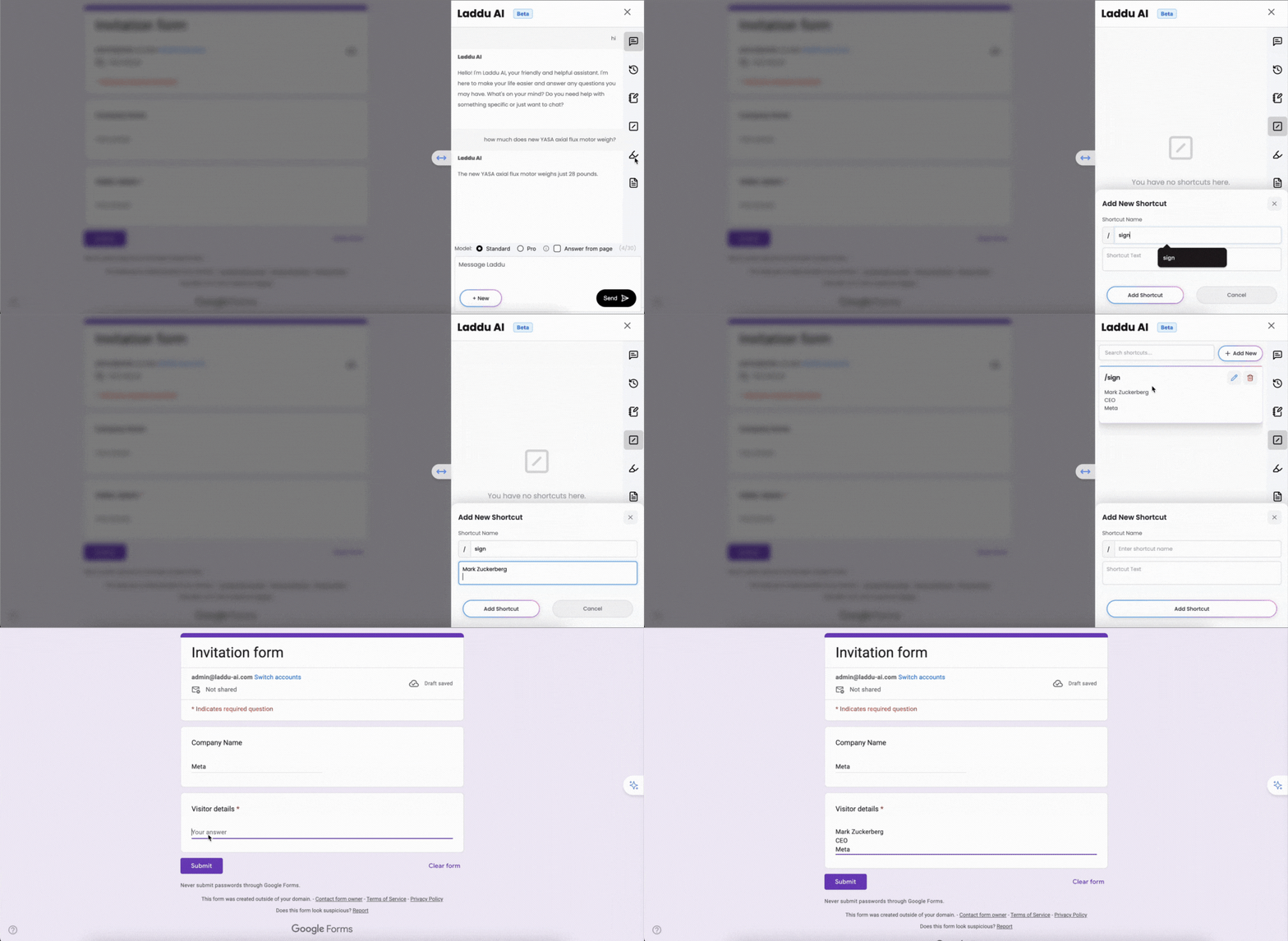
Select any text on any webpage to access powerful tools - save notes, create highlights, and get instant AI assistance through smart context menus.
-
Smart Notes - Select text, save instantly
Select any text on any webpage and save to personal notes. Perfect for research findings, quotes, and ideas. Access from any tab.
-
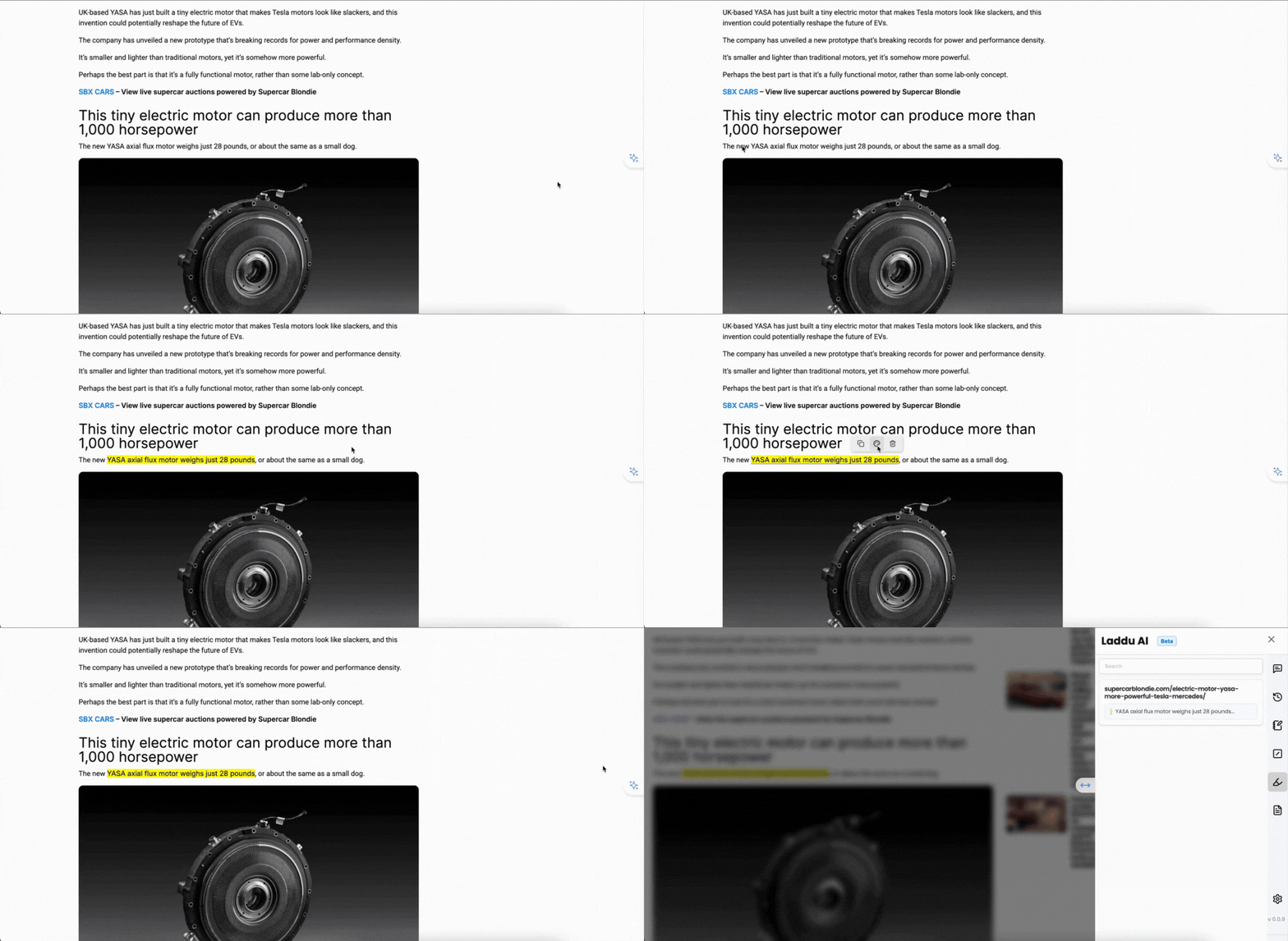
Highlights - Select text, highlight permanently
Select important text and highlight with one click. Highlights are saved locally for later review across different websites.
-
Context Menu - AI actions on selection
Select text and get AI actions: summarize, identify key points, quick replies, translate, explain concepts, extract data - all without leaving the page.
-
Works everywhere you browse
Smart selection tools work across all websites - articles, emails, social media, documents. Notes and highlights sync across tabs.
Affordable AI for Everyone
We are in beta and so giving it out for user testing for free. You can download Laddu AI and start using it to unlock the power of intelligent assistance in your everyday browsing.
Download ExtensionFrequently Asked Questions
Get answers to the most common questions about Laddu AI.
Laddu AI is a privacy-focused browser extension that transforms your browser into an intelligent AI-powered workspace. It provides powerful AI assistance directly in every tab, with features including chat, notes, highlights, and PDF to audiobook conversion - all while keeping your data secure and private.
All conversations stay local in your browser - never stored on external servers. No account required - zero personal information collected. No tracking, no data mining, no privacy invasion. Your chats and personal data remain completely private.
Laddu AI offers intelligent chat interface, context-aware AI that can analyze current page content, smart text highlighting, personal notes manager, text shortcuts that expand automatically as you type (e.g., typing /sig expands to your signature), PDF to audiobook converter, quick context menus, keyboard shortcuts for instant access, and more.
After installing, click the Laddu AI icon in your toolbar or use the keyboard shortcut Ctrl+Shift+Period (Cmd+Shift+Period on Mac) to access your AI assistant on any webpage. Select text on any page to reveal quick-access context menus for instant highlighting, note-taking, and AI assistance.
Transform any PDF document into an audiobook format for on-the-go listening. Simply upload your PDF file through Laddu AI and it will be converted to audio format that you can listen to anytime, anywhere.
Yes, Laddu AI is currently in beta and completely free to use. We believe in providing value to our users without requiring payment or subscriptions.
Laddu AI is currently available for Chrome only. We are continuously working to expand our browser support to include Firefox, Safari, and Edge in the future.
What Our Users Say
Hear from our users about how Laddu AI has transformed their workflow and boosted their productivity.
SM
Shreyash Mahajan
Software Engineer
"Laddu AI has been a game-changer for my productivity. I can now use ChatGPT like functionality from any tab. No more ChatGPT."
MP
Manju Priya
Content Creator
"I was skeptical about using a new AI tool first, but Laddu AI has completely changed the way work. It's so convenient and always available in the side. No more context switching."
V
Vedanshita
Student
"Laddu helps me complete my homework. It is very useful for preparing for tests and in explaining difficult topics."
AG
Adarsh Gupta
Professional
"Great tool and easy accessibility! Now I don't need to open new tabs for GPTs"
AR
Ashok Regar
Professional
"Wow! amazed with the good things it has. It help me do my work faster and better. love the easy use of the tool. summarize is a very good feature which I use most of the time."
KP
Kashyap PLN
Professional
"I found it most useful in my work routine. Gives most accurate results when compared with its peers. The explanation it provides in its results is crisp, clear and detailed."
How to Use Laddu AI
Get started with Laddu AI in 3 simple steps
Click the Laddu AI icon in your toolbar to open the AI assistant on any webpage.
Use keyboard shortcut Ctrl+Shift+Period (Cmd+Shift+Period on Mac) for instant access.
Select text on any page to reveal quick-access context menus for instant AI assistance.
Contact Us
Contact Us For Queries/Feedback
Laddu AI is the perfect productivity companion that respects your privacy while supercharging your browsing experience. No accounts, no subscriptions - just powerful AI tools that keep your information secure.